F: Hat jemand einen Codeausschnitt, der dafür sorgt, dass ein Text erscheint, wenn etwas berührt wird, der wieder verschwindet wenn man sich fort bewegt?
A: Hier ist ein Beispiel.
TEXT* my_text =
{
pos_x = 50;
pos_y = 30;
layer = 10;
string ("Please don't kill me!");
}
function i_am_touched()
{
set(my_text, VISIBLE);
}
action coward_entity()
{
while (!player) {wait (1);}
my.emask |= (ENABLE_IMPACT | ENABLE_ENTITY);
my.event = i_am_touched;
while (1)
{
if (vec_dist (player.x, my.x) > 200)
{
reset(my_text, VISIBLE);
}
wait (1);
}
}
F: Ich benötige ein Skript, das dafür sorgt, dass die Kamera dem Mauszeiger sanft folgt, diese aber stoppt, wenn der Mauszeiger sich in der Nähe der Bildschirmmitte befindet.
A: Bitte schön.
BMAP* arrow_pcx = "arrow.pcx";
function mouse_startup()
{
mouse_mode = 1;
mouse_map = arrow_pcx;
while (1)
{
vec_set(mouse_pos, mouse_cursor);
wait(1);
}
}
function camera_startup()
{
VECTOR* offset;
while (1)
{
offset.x = mouse_pos.x - screen_size.x / 2;
offset.y = mouse_pos.y - screen_size.y / 2;
// allow a zone of 60 pixels in the center of the screen where the camera doesn't follow the mouse pointer
if (abs(offset.x) > 30)
{
camera.pan -= 0.01 * offset.x * time_step; // 0.01 gives the rotation speed
}
if (abs(offset.y) > 30)
{
camera.tilt -= 0.01 * offset.y * time_step;
}
wait (1);
}
}
F: Ich brauche einen 3D Pfeil, der nach unten zeigt und sich auf und ab bewegt, um dem Spieler die nächste Aufgabe zu zeigen.
A: Erstellen Sie ein 3D Pfeil Model, das nach unten zeigt und geben Sie diesem den folgenden Code.
action my_arrow()
{
while (1)
{
// find the best combination by playing with 3 (amplitude) and 15 (speed)
my.z += 3 * sin(total_ticks * 15) * time_step;
wait (1);
}
}
F: Ich möchte zeitgleich mit meiner "walk" Animation Schrittgeräusche ertönen lassen und habe mich gefragt ob es möglich ist herauszufinden, in welchem Frame die Animation gerade ist und gegebenenfalls ein Geräusch abzuspielen.
A: Betrachten Sie Ihr Model zunächst im MED; ich verwende guard.mdl als Beispiel. Dieses Model hat vier "walk" Frames und die Frames "walk2" und "walk4" sehen so aus, als leisteten sie das Gewünschte. Das bedeutet, dass die Geräusche bei 50% des Animationszyklus ertönen sollten und nahe am Ende, nehmen wir 95%, da 100% nicht immer erreicht wird. Und hier ist der Code, der dafür Sorge trägt.
SOUND* step_wav = "step.wav";
// the action doesn't include a c_move line of code in order to allow you to see the footsteps clearly
action footstep_guy()
{
var anim_percentage;
var sounded_once;
while (1)
{
ent_animate(my, "walk", anim_percentage, ANM_CYCLE);
anim_percentage += 3 * time_step; // "3" controls the animation speed
anim_percentage %= 100;
if (anim_percentage < 10)
{
sounded_once = 1;
}
if ((anim_percentage > 50) && (sounded_once == 1)) // play the first footstep sound at 50%
{
sounded_once = 2;
ent_playsound(my, step_wav, 200);
}
if ((anim_percentage > 95) && (sounded_once == 2)) // play the second footstep sound at 95%
{
sounded_once = 3;
ent_playsound(my, step_wav, 200);
}
wait (1);
}
}
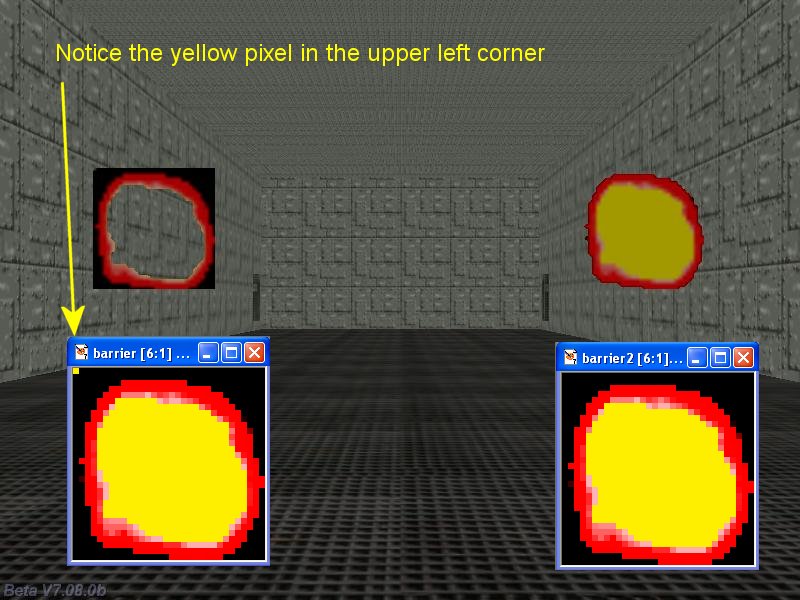
F: Ich möchte mehrere Sprites im Spiel plazieren, aber sie haben einen Hintergrund, der nicht sichtbar sein soll. Wie erreiche ich es, dass die Engine eine bestimmte Farbe ignoriert?
A: Fügen Sie diesen Code in Ihr Projekt ein und verwenden Sie TGA Texturen ohne Alpha Channel für Ihre Sprites. Die Farbe des Pixels in der oberen linken Ecke des Bitmaps wird ignoriert, wie im Beispiel unten.
function set_transparency_startup()
{
// use the color of the pixel in the upper left corner of the bitmap for transparency
d3d_autotransparency = 1;
}
F: Ich möchte die nächste Kamera aktivieren und auf den Spieler ausrichten, sobald er in die Nähe kommt.
A: Hier ist eine aktualisierte Fassung meines "Resident Evil" Kameracodes aus AUM 4.
var camera_distance[50]; // up to 50 cameras
var temp_counter = 0; // array index
var winner = 3000; // default distance between the camera and the player
var found_camera = 1; // index for the active camera
function cameras_startup()
{
while (1)
{
temp_counter += 1;
temp_counter %= 50;
if ((camera_distance[temp_counter] < winner) && (camera_distance[temp_counter] > 0))
{
winner = camera_distance[temp_counter];
found_camera = temp_counter;
}
else
{
winner = camera_distance[found_camera];
}
wait (1);
}
}
// set skill1 to 1 for the first camera, skill1 = 2 for the second camera and so on
action recam() // attach this action to your camera entities
{
var temp;
while (!player) {wait(1);}
set (my, INVISIBLE);
set (my, PASSABLE);
camera.tilt = my.tilt;
camera.roll = my.roll;
if (my.skill1 == 0) // the player has forgotten to set skill1 for one of the cameras?
{
beep(); // then beep twice and then shut down the engine
beep();
sys_exit(NULL);
}
while (1)
{
camera_distance[my.skill1] = vec_dist(my.x, player.x);
if (winner > camera_distance[my.skill1] - 50) // hysteresis
{
camera.x = my.x;
camera.y = my.y;
camera.z = my.z;
vec_set(temp, player.x);
vec_sub(temp, my.x);
vec_to_angle(camera.pan, temp);
}
wait (1);
}
}
F: Können Sie mir helfen ein Fadenkreuz zu erstellen, das mit den Pfeiltasten bewegt wird, wohingegen sich der Spieler mit den WASD Tasten fortbewegt?
A: Hier ist ein Beispiel.
BMAP* cross_tga = "cross.tga";
PANEL* crosshair_pan =
{
bmap = cross_tga;
pos_x = 400;
pos_y = 300;
flags = VISIBLE;
}
function crosshair_startup() // centers the crosshair on the screen regardless of the video resolution
{
while (1)
{
crosshair_pan.pos_x = (screen_size.x - bmap_width(cross_tga)) / 2;
crosshair_pan.pos_y = (screen_size.y - bmap_height(cross_tga)) / 2;
wait (1);
}
}
action players_code()
{
player = my; // I'm the player
set (my, INVISIBLE); // no need to see player's model in 1st person mode
while (1)
{
// move the player using the "W", "S", "A" and "D" keys; "10" = movement speed, "6" = strafing speed
c_move (my, vector(10 * (key_w - key_s) * time_step, 6 * (key_a - key_d) * time_step, 0), nullvector, GLIDE);
if (key_space) // if the player presses the space key fire a bullet
{
// create your own function that fires bullets or get it from one of the Aum workshops
}
vec_set (camera.x, player.x); // use player's x and y for the camera
camera.z += 30; // place the camera 30 quants above the player on the z axis (approximate eye level)
camera.pan -= 5 * key_force.x * time_step; // rotate the camera around using the arrow keys
camera.tilt += 3 * key_force.y * time_step; // do this on the x and y axis
player.pan = camera.pan; // the camera and the player have the same pan angle
wait (1);
}
}
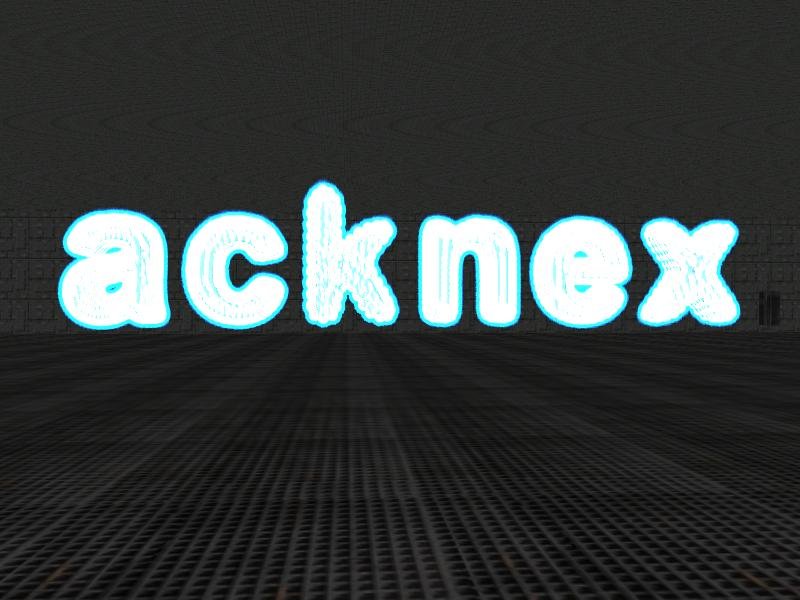
F: Wie kann ich einen leuchtenden Partikeleffekt erstellen, der ein 3D Model umgibt?
A: Hier ein solcher Effekt.
BMAP* particle_tga = "particle.tga";
function init_startup()
{
max_particles = 50000;
}
function fade_particle(PARTICLE *p)
{
p.alpha -= 50 * time_step;
if (p.alpha < 0)
p.lifespan = 0;
}
function particle_function(PARTICLE *p)
{
vec_add (p.vel_x, vector(0, 0, 5 + random(1)));
set(p, MOVE | BRIGHT);
p.alpha = 30 + random(35);
p.bmap = particle_tga;
p.size = 30;
p.lifespan = 30;
p.event = fade_particle;
}
action glowing_models()
{
var particle_pos[3];
while (1)
{
my.skill1 = 0;
while (my.skill1 < ent_vertices (my)) // go through all the vertices of the model
{
my.skill1 += 1;
vec_for_vertex(particle_pos, my, my.skill1);
effect(particle_function, 1, particle_pos, nullvector);
}
wait (1);
}
}
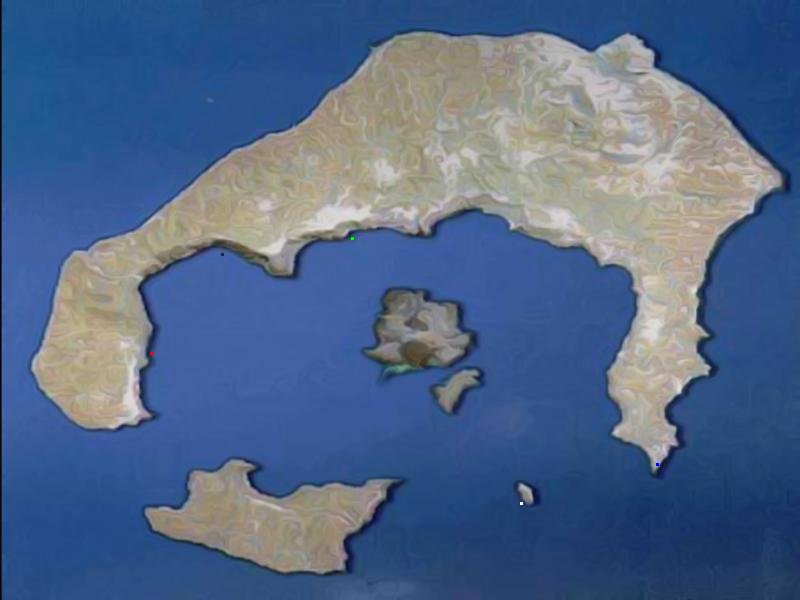
F: Gibt es einen einfachen Weg, mehrere kleine farbige Punkte auf einer Karte anzuzeigen? Ich habe es bislang mit vielen 1x1 Pixel großen Panels versucht.
A: Bitte sehr.
var map_visible = 0;
BMAP* map_tga = "map.tga";
PANEL* map_pan =
{
bmap = map_tga;
layer = 20;
pos_x = 0;
pos_y = 0;
}
function toggle_it()
{
map_visible += 1;
map_visible %= 2;
if (map_visible)
{
set (map_pan, VISIBLE);
}
else
{
reset (map_pan, VISIBLE);
}
}
function toggle_map_startup()
{
on_m = toggle_it;
}
function draw_dots_startup()
{
draw_textmode("Arial", 1, 20, 100); // set the font, its type and size
var alpha_factor = 0;
while(1)
{
if (map_visible)
{
draw_text(".", 150, 340, vector(0, 0, 255)); // plot a red pixel at 150, 340
draw_text(".", 350, 225, vector(0, 255, 0)); // plot a green pixel at 350, 225
draw_text(".", 655, 450, vector(255, 0, 0)); // plot a blue pixel at 655, 450
draw_text(".", 220, 240, vector(32, 32, 32)); // plot a dark pixel at 220, 240
draw_text(".", 520, 490, vector(255, 255, 255)); // plot a white pixel at 520, 490
}
wait(1);
}
}
F: Ich habe das erste Level meines Spiels im WED erstellt. Wenn ich ihn starten will, sind die Sprites nicht sichtbar. Wo liegt das Problem?
A: Es gibt zwei mögliche Ursachen:
- Sie verwenden TGA Sprites ohne Alpha (Transparenz) Kanal. Die neueren Versionen der Engine setzen diesen voraus.
- Die Kamera befindet sich in einer Wand. Drücken Sie auf "0", um sie zu befreien und bewegen Sie sie mit den Pfeiltasten oder (noch besser) verwenden Sie einen Spieler / Kamera Code aus dem AUM.