F: Wie erstelle ich ein Bewegungsskript für den Spieler und eine Kamera, die bei der WASD Bewegung immer hinter dem Spieler bleibt?
A: Bitte schön.
action my_player()
{
var movement_speed = 10; // movement speed
var walk_percentage;
var stand_percentage;
VECTOR temp;
player = my; // I'm the player
while (1)
{
player.pan -= 5 * mouse_force.x * time_step; // rotate the player using the mouse
if(!key_w && !key_s) // the player isn't moving at all?
{
ent_animate(my, "stand", stand_percentage, ANM_CYCLE); // then play its "stand" animation
stand_percentage += 5 * time_step; // 5 = animation speed
}
else // the player is moving?
{
ent_animate(my, "walk", walk_percentage, ANM_CYCLE); // then play its "walk" animation
walk_percentage += 6 * time_step; // 6 = animation speed
}
camera.x = player.x - 250 * cos(player.pan);
camera.y = player.y - 250 * sin(player.pan);
camera.pan = player.pan; // the camera and the player have the same pan angle
camera.z = player.z + 150; // place the camera above the player, play with this value
camera.tilt = -25;
temp.x = movement_speed * (key_w - key_s) * time_step;
temp.y = movement_speed * (key_a - key_d) * 0.6 * time_step;
temp.z = 0;
c_move (my, temp.x, nullvector, IGNORE_PASSABLE | GLIDE);
wait (1);
}
}
F: Wie kann ich meinen Entities möglichst einfach Pixel & Vertex Shader hinzufügen?
A: Zunächst brauchen Sie eine .fx Datei, die den Shader enthält - es gibt viele davon im Conitec Forum. Kopieren Sie diese Datei und alle weiteren benötigten Ressourcen (falls nötig) in Ihren Projektordner. Definieren Sie dann ein Material mit der fx Datei, so wie hier:
MATERIAL* my_test_material =
{
effect = "my_shader.fx"; // put the name of your own .fx file here
}
Erstellen Sie schließlich eine Action, die der Entity dieses Material zuweist.
action easy_shaders()
{
my.material = my_test_material;
// the rest of the code for your entity goes here
}
F: Wie erstellt man Code, der Einschusslöcher auf Oberflächen erzeugt?
A: Hier ist ein aktualisiertes Beispiel aus AUM 59.
VECTOR trace_coords;
var weapon_height;
var current_ammo = 20;
var players_ammo;
STRING* hithole_tga = "hithole.tga";
STRING* target_mdl = "target.mdl";
SOUND* bullet_wav = "bullet.wav";
SOUND* gotweapon2_wav = "gotweapon2.wav";
SOUND* nobullets_wav = "nobullets.wav";
SOUND* gotammo_wav = "gotammo.wav";
function fire_bullets(); // creates the bullets
function show_target(); // displays the (red) target model
function display_hithole(); // shows the hit hole bitmap
ENTITY* weapon2_ent =
{
type = "ar18.mdl"; // weapon model
pan = 0; // weapon angle
x = 55; // 55 quants ahead of the view, play with this value
y = -22; // 22 quants towards the right side of the screen, play with this value
z = -22; // 22 quants below, play with this value
pan = 2; // weapon's pan angle (you can also use tilt and roll)
}
action player1() // attach this action to your player
{
var movement_speed = 10; // movement speed
VECTOR temp;
player = my; // I'm the player
set (my, INVISIBLE);
while (1)
{
player.pan -= 7 * mouse_force.x * time_step;
camera.x = player.x;
camera.y = player.y;
camera.z = player.z + 50 + 1.1 * sin(my.skill44); // play with 50 and 1.1
camera.pan = player.pan;
camera.tilt += 5 * mouse_force.y * time_step;
vec_set (temp.x, my.x); // trace 10,000 quants below the player
temp.z -= 10000;
temp.z = -c_trace (my.x, temp.x, IGNORE_ME | IGNORE_PASSABLE | USE_BOX);
temp.x = movement_speed * (key_w - key_s) * time_step;
temp.y = movement_speed * (key_a - key_d) * 0.6 * time_step;
c_move (my, temp.x, nullvector, IGNORE_PASSABLE | GLIDE);
wait (1);
}
}
action players_weapon() // attach this action to your player model
{
set (my, PASSABLE); // the weapon is made passable
while (!player) {wait (1);} // we wait until the player is created
while (vec_dist (player.x, my.x) > 50) // we wait until the player comes closer than 50 quants
{
my.pan += 3 * time_step;
wait (1);
}
players_ammo = 300;
snd_play (gotweapon2_wav, 80, 0);
set (my, INVISIBLE);
set (weapon2_ent, VISIBLE);
wait (-1);
ent_remove (my);
}
function use_weapon_startup()
{
on_mouse_left = fire_bullets; // call this function when the left mouse button is pressed
proc_mode = PROC_LATE; // run this function at the end of the function scheduler list (elliminates jerkiness)
VECTOR player1_pos; // stores the initial position of the player
VECTOR player2_pos; // stores the position of the player after a frame
while (!player) {wait (1);}
while (1)
{
vec_set (player1_pos.x, player.x); // store the initial player position
if (is (weapon2_ent, VISIBLE)) // the weapon is visible?
{
vec_set(trace_coords.x, vector(10000, 0, 0)); // the weapon has a firing range of up to 10,000 quants
vec_rotate(trace_coords.x, camera.pan);
vec_add(trace_coords.x, camera.x);
if (c_trace(camera.x, trace_coords.x, IGNORE_ME | IGNORE_PASSABLE) > 0) // hit something?
{
ent_create (target_mdl, target.x, show_target); // then show the target model
}
}
wait (1);
vec_set (player2_pos.x, player.x); // store player's position after 1 frame
if (vec_dist (player1_pos.x, player2_pos.x) != 0) // the player has moved during the last frame?
{
weapon_height += 30 * time_step; // then offset weapon_height (30 = weapon waving speed)
weapon2_ent.z += 0.03 * sin(weapon_height); // (0.03 = weapon waving amplitude)
}
}
}
function show_target()
{
set (my, PASSABLE); // the target model is passable
my.ambient = 100; // and should look bright enough
my.scale_x = minv (6, vec_dist (my.x, camera.x) / 500); // play with 6 and with 500
my.scale_y = my.scale_x;
my.scale_z = my.scale_x;
wait (1);
ent_remove (my);
}
function fire_bullets()
{
if (is (weapon2_ent, INVISIBLE)) {return;} // don't do anything if the player hasn't picked up the weapon yet
if (current_ammo > 0) // got ammo?
{
c_trace(camera.x, trace_coords.x, IGNORE_ME | IGNORE_PASSABLE | ACTIVATE_SHOOT);
if (you == NULL) // hit a wall?
{
ent_create (hithole_tga, target.x, display_hithole); // then create a bullet hit hole
}
snd_play (bullet_wav, 100, 0); // play the bullet sound at a volume of 100
current_ammo -= 1; // decrease the number of bullets
}
else // no ammo left?
{
snd_play (nobullets_wav, 100, 0); // then play the noammo.wav sound
}
}
function display_hithole()
{
vec_to_angle (my.pan, normal); // orient the hit hole sprite correctly
vec_add(my.x, normal.x); // move the sprite a bit away from the wall
set (my, PASSABLE); // the hit hole bitmap is passable
set (my, TRANSLUCENT); // and transparent
my.ambient = 50;
my.roll = random(360); // and has a random roll angle (looks nicer this way)
my.scale_x = 0.5; // we scale it down
my.scale_y = my.scale_x; // on the x and y axis
wait (-20); // show the hit hole for 20 seconds
ent_remove (my); // and then remove it
}
action ammo_pack() // attach this action to your ammo pack models
{
set (my, PASSABLE);
while (!player) {wait (1);}
while (vec_dist (player.x, my.x) > 50)
{
my.pan += 3 * time_step;
wait (1);
}
snd_play (gotammo_wav, 80, 0);
set (my, INVISIBLE);
current_ammo += 20; // use your own value here
wait (-1);
ent_remove (my);
}
F: Wie kann ich erreichen, dass ein Charakter die Größe ändert, wenn er getroffen wird?
A: Hier ist ein Beispiel.
function got_shot()
{
if (you == player) {return;} // don't react if the player touches the entity
my.scale_x += 0.1;
my.scale_y = my.scale_x;
my.scale_z = my.scale_x;
}
action my_entity()
{
set (my, POLYGON);
my.emask |= (ENABLE_IMPACT | ENABLE_SHOOT); // shoot using real bullets or c_trace
my.event = got_shot; // the event function runs every time when the entity is hit
}
F: Ich habe eine Animation in eine .avi datei umgewandelt (Indeo 5.1), aber in 3DGS sieht dieses nicht sehr gut aus (schlechte Bildqualität, manchmal Ruckler). Wie kann ich Videos in hoher Qualität mit media_play abspielen?
A: Wenn es auf Geschwindigkeit ankommt, verwenden Sie möglichst 16 Bit Farben. Hohe Auflösungen und Bildraten sind ebenfalls ungünstig. Sie können Filme mit 800 x 600 Pixeln Auflösung bei 15 fps auf einem gewöhnlichen Rechner abspielen; das habe ich gerade getestet. Verwenden Sie außerdem keine Filme, die weitere Codecs verwenden; wmv Dateien werden auf allen Windowscimputern seit 2001 unterstützt.
F: Wie kann ich eine Want oder einen kleinen Teil davon mit einer Kugel zerstören?
A: Erstellen Sie die Wand (bzw. den Teil der zerstörbar sein soll) aus kleinen mdl oder wmb Entities zusammen und geben Sie diesen die folgende Action.
STRING* explosion_pcx = "explo+7.pcx";
function animated_explosion()
{
wait (1);
set (my, PASSABLE);
my.ambient = 100;
while (my.frame < 7)
{
my.frame += 1 * time_step;
wait (1);
}
ent_remove(my);
}
function destroy_wall()
{
if (you == player) {return;} // don't react if the player touches the wall
my.event = NULL; // don't react to other bullets from now on
set (my, INVISIBLE);
set (my, PASSABLE);
ent_create (explosion_pcx, my.x, animated_explosion);
wait (-2); // wait until the explosion frames are played
ent_remove (my);
}
action wall_piece()
{
my.emask |= (ENABLE_IMPACT | ENABLE_SHOOT); // shoot with real bullets or c_trace
my.event = destroy_wall;
}
F: Wie kann ich im Skript abfragen ob das Model zum Beispiel "model.mdl" ist?
A: Hier ist ein Beispiel.
STRING* temp_str = " ";
// attach the action below to several entities; only the one that is named "model.mdl" will rotate
action test_me()
{
str_for_entfile(temp_str, my);
if (str_cmpi(temp_str, "model.mdl")) // the entity is named model.mdl?
{
while (1) // then let the rotation begin!
{
my.pan += 4 * time_step;
wait (1);
}
}
}
F: Wie erstelle ich eine Außenkamera, die hinter dem Spieler bleibt und um ihn rotiert, wenn er sich für eine Weile nicht bewegt?
A: Hier ist ein Beispiel.
action player1()
{
var movement_speed = 10; // movement speed
var anim_percentage;
var standing_still = 0;
var camangle;
VECTOR temp;
VECTOR temp2;
player = my; // I'm the player
while (1)
{
if((!key_w) && (!key_s) && (!key_a) && (!key_d)) // the player isn't moving at all?
{
standing_still += time_step / 8; // play with 8 until you get the proper pausing interval
ent_animate(my, "stand", anim_percentage, ANM_CYCLE); // and play the "stand" animation
}
else // the player is moving?
{
camangle = 0; // reset the camera rotation angle
standing_still = 0; // reset standing_still
ent_animate(my, "walk", anim_percentage, ANM_CYCLE); // and play the "walk" animation
}
anim_percentage += 5 * time_step; // 5 = animation speed
if (standing_still > 10) // the player didn't move at all lately? Then rotate the camera around it
{
camera.x = player.x - 250 * cos(camangle);
camera.y = player.y - 250 * sin(camangle);
camangle += 0.5 * time_step;
vec_set(temp2.x, my.x);
vec_sub(temp2.x, camera.x);
vec_to_angle(camera.pan, temp2);
}
else // the player has changed its position recently?
{
camera.x = player.x - 250 * cos(player.pan);
camera.y = player.y - 250 * sin(player.pan);
camera.pan = player.pan; // the camera and the player have the same pan angle
}
camera.z = player.z + 150; // place the camera above the player, play with this value
camera.tilt = -25;
temp.x = movement_speed * (key_w - key_s) * time_step;
temp.y = movement_speed * (key_a - key_d) * 0.6 * time_step;
temp.z = 0;
c_move (my, temp.x, nullvector, IGNORE_PASSABLE | GLIDE);
wait (1);
}
}
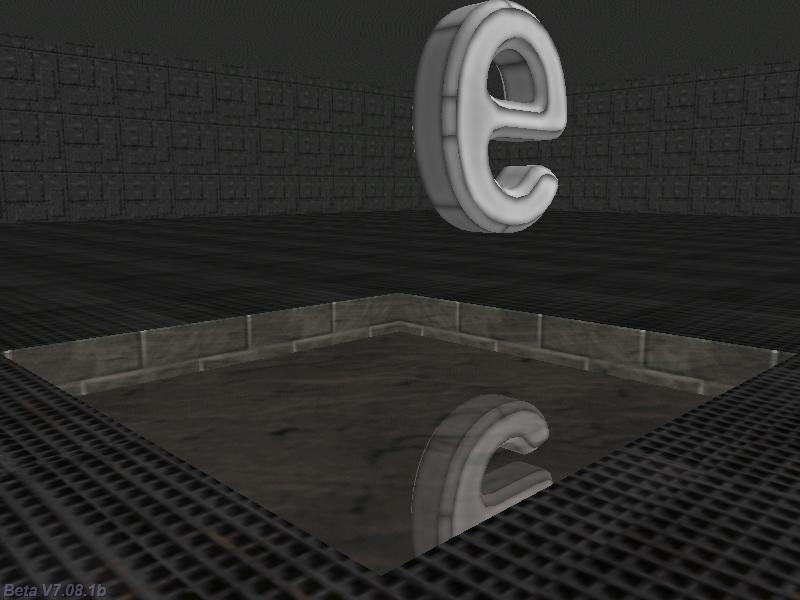
F: Wie verwendet man FXA_mirror? Es funktioniert nicht mehr! Ich verwende A7 Professional.
A: Erstellen Sie eine Map Entity; seten Sie bei der spiegelnden Oberfläche die "mirror" Flag und die "none" Flag auf allen anderen. Schneiden Sie dann ein Loch in den Boden und plazieren Sie dort die Spiegelentity. Geben Sie dieser dann die folgende Action.
VIEW* fxa_mirror_view =
{
layer = 10;
}
action FXA_Mirror() // attach this action to your map entity
{
// initialize camera portal for realtime reflections
camera.portal = fxa_mirror_view;
set (fxa_mirror_view, NOSHADOW); // suppress shadows in the mirror
set (fxa_mirror_view, PORTALCLIP); // clip at portal plane
while(1)
{
proc_mode = PROC_LATE; // place it at the end of the function list - the camera must be moved before
fxa_mirror_view.genius = camera.genius;
fxa_mirror_view.aspect = -camera.aspect; // flip the image upside down
fxa_mirror_view.arc = camera.arc;
fxa_mirror_view.x = camera.x;
fxa_mirror_view.y = camera.y;
fxa_mirror_view.z = 2 * camera.portal_z - camera.z; // move the camera at its mirror position
fxa_mirror_view.pan = camera.pan;
fxa_mirror_view.tilt = -camera.tilt; // flip the vertical camera angle
fxa_mirror_view.roll = -camera.roll;
wait(1);
}
}
F: Mein NPC soll sich dem Spieler zuwenden und seinen Text einmal sprechen, aber erst wenn der direkt zum Spieler schaut. Wie erreiche ich das?
A: Bitte sehr.
action my_npc() // attach this action to your npc
{
// make sure that the player action includes this line of code: "player = my;"
VECTOR temp;
var rot_speed = 20; // 20 gives the rotation speed, play with it
var npc_angle;
var new_line = 0;
while (1)
{
if (vec_dist (my.x, player.x) < 300)
{
vec_set(temp.x, player.x);
vec_sub(temp.x, my.x);
vec_to_angle(npc_angle, temp.x);
if (ang(npc_angle - my.pan) < -3)
{
my.pan -= rot_speed * time_step;
}
else
{
if (abs(ang(npc_angle - my.pan)) > 3)
{
my.pan += rot_speed * time_step;
}
else // the npc faces the player here, so let's play its line
{
if (!new_line) // the line hasn't been played yet?
{
new_line = 1;
beep();
// plays your line here only once
}
}
}
}
wait (1);
}
}