F: Gibt es einen "offiziellen" Semikolon Zähler für den "100 Codezeilen" Wettbewerb?
A: Nein, aber Sie können Ihren Lieblings-Texteditor (z.B. Microsoft Word oder Open Office Writer) verwenden. Starten Sie ihn und öffnen Sie Ihren Quellcode. Wählen Sie "Suchen und Ersetzen" (normalerweise Strg + F) und ersetzen Sie alle Zeichen ; durch andere, wie z.B. ? und klicken Sie auf "Alle ersetzen". Das Programm wird dies ausführen und Ihnen die Anzahl mitteilen. Sie dürfen die Datei danach natürlich NICHT abspeichern! Diese Prozedur muss nun für alle Dateien durchgeführt werden, die Code enthalten
F: Haben Sie ein Codebeispiel, mit dem ich mein Model mit den Pfeiltasten kontrollieren kann (laufen und angreifen)?
A: Hier ist ein solches Beispiel.
action players_action() // simple walk / stand / attack / death player action
{
player = my; // I'm the player
var anim_percentage;
var attack_percentage;
var sword_base;
var sword_tip;
my.skill55 = 100; // the player has 100 health points
while (my.skill55 > 0)
{
// place the camera 300 quants behind the player and 250 quants above it
vec_set (camera.x, vector (-300, 0, 250));
vec_rotate (camera.x, player.pan);
vec_add (camera.x, player.x);
camera.pan = player.pan;
camera.tilt = -30; // look down at the player
// rotate with the left / right arrow keys or with the mouse
my.pan += 5 * (key_cul - key_cur) * time_step - 10 * mouse_force.x * time_step;
// move forward / backward using the up / down arrow keys, 10 gives the movement speed
c_move (my, vector (10 * (key_cuu - key_cud) * time_step, 0, 0), nullvector, GLIDE);
if (key_cuu || key_cud) // the player is walking?
{
ent_animate(my, "walk", anim_percentage, ANM_CYCLE);
anim_percentage += 8 * time_step; // "8" controls the "walk" animation speed
}
else // the player is standing still?
{
ent_animate(my, "stand", anim_percentage, ANM_CYCLE);
anim_percentage += 0.5 * time_step; // "0.5" controls the "stand" animation speed
}
if (mouse_left) // if we press the left mouse button
{
attack_percentage = 0; // reset the "attack" animation frames
while (attack_percentage < 100)
{
vec_for_vertex (sword_tip, my, 456); // sword tip vertex - get the value in Med
vec_for_vertex (sword_base, my, 512); // sword base vertex - get the value in Med
// the player has hit something?
if (c_trace (sword_base, sword_tip, IGNORE_ME | IGNORE_PASSABLE) > 0)
{
if (you) // the player has hit an entity (not a level block, etc)
{
// damage your enemies here, using something like this
you.skill55 -= 10 * time_step; // the enemies must store their health points inside skill55
}
}
ent_animate(my, "attack", attack_percentage, NULL);
attack_percentage += 6 * time_step;
wait (1);
}
}
wait (1);
}
// the player is dead here
anim_percentage = 0;
while (anim_percentage < 90)
{
ent_animate(my, "death", anim_percentage, NULL);
anim_percentage += 3 * time_step; // "3" controls the animation speed
wait (1);
}
}
F: Ich habe ein einfaches Programm geschrieben, das auf 800 x 600 Pixeln läuft. Wenn jemand das Fenster vergrößert, funktionieren meine Knöpfe nicht mehr. Kann ich die Größe des Fensters festsetzen?
A: Schreiben Sie diese Codezeilen in eine Ihrer Dateien.
function init_startup()
{
// set the position of the window to (50, 20), its size to 800x600 and hide its borders (1 does that)
video_window(vector (50, 20, 0), vector(800, 600, 0), 1, NULL);
while (1)
{
// don't allow the engine window to be switched to full screen mode if the player presses Alt + Enter
video_set(800, 600, 0, 2);
wait (1);
}
}
F: Ich brauche den Code für ein "Sternenfeld", das im Hintergrund Partikel erzeugt. Kann mir jemand helfen?
A: Schreiben Sie "max_particles = 30000;" als erste Codezeile der main Funktion und verwenden Sie dann dieses Beispiel.
BMAP* particle_tga = "particle.tga";
function fade_particle(PARTICLE *p)
{
p.alpha -= 1 * time_step;
if (p.alpha < 0)
p.lifespan = 0;
}
function particle_function(PARTICLE *p)
{
// the particles move towards the negative x axis with a speed of -80...-50; change these values if you want to
vec_add (p.vel_x, vector(-50 - random(30), 0, 0)); // this line sets the speed on the x, y, z axis
//set(p, MOVE | BRIGHT | STREAK); // use this line if your engine version supports it (comment the following line)
set(p, MOVE | BRIGHT);
p.alpha = 30 + random(35);
p.bmap = particle_tga;
p.size = 2;
p.lifespan = 50;
p.event = fade_particle;
}
action starfield() // attach this action to a sphere model
{
vec_set(my.scale_x, vector(4, 4, 4)); // set the scale for the starfield
set (my, PASSABLE);
set (my, INVISIBLE);
var particle_pos[3];
while (1)
{
my.roll += 2 * time_step; // rotate the invisible sphere, play with these values
my.tilt += 1 * time_step;
my.pan += 0.5 * time_step;
// place the starfield generator 1,000 quants in front of the camera on the x axis
vec_set (my.x, camera.x);
my.x += 1000;
my.skill1 = 0;
// go through all the vertices of the model, more vertices = more particles
while (my.skill1 < ent_vertices (my))
{
my.skill1 += 1;
vec_for_vertex(particle_pos, my, my.skill1);
effect(particle_function, 1, particle_pos, nullvector);
}
wait (-0.1);
}
}
F: Ich habe eine Box mit einem Zylinder davor, der aussieht wie ein Drehknopf, der mit einer Taste betätigt werden kann. Ich möchte ein Geräusch ertönen lassen, wenn der Knopf eine bestimmte Position erreicht.
A: Verwenden Sie dies als Grundlage.
var safe_unlocked = 0;
SOUND* rotating_wav = "rotating.wav";
SOUND* unlocked_wav = "unlocked.wav";
action safe_cracker() // attach this action to your dial model
{
var rotating_handle;
var unlocked_once = 0;
while (1)
{
testos = my.roll;
if (key_r)
{
my.roll += 4 * time_step;
}
if (key_t)
{
my.roll -= 4 * time_step;
}
my.roll += 360; // keep the angle in the 0...360 degrees range
my.roll %= 360;
if (key_r || key_t) // one of the rotating keys is pressed?
{
if (!snd_playing(rotating_handle)) // the rotation sound isn't playing already?
{
rotating_handle = snd_play(rotating_wav, 20, 0); // then let's play it!
}
}
// place the dial in the (200...205) degrees interval in order to unlock the safe
if ((my.roll > 200) && (my.roll < 205) && (unlocked_once == 0))
{
unlocked_once = 1; // don't allow the safe to be unlocked more than once
snd_play(unlocked_wav, 60, 0);
safe_unlocked = 1;
}
wait (1);
}
}
function unlocked_startup()
{
while (!safe_unlocked) {wait (1);} // wait until the safe is unlocked
// do your own stuff here: open the safe door, display an access code, etc
beep(); beep(); beep();
}
F: Ich bemerkte kürzlich, dass die Schatten in meinem Level nicht mehr so gut sind wie ich sie in Erinnerung hatte. Ich bin nicht sicher, ob das Einbildung ist, da ich bisher nie sehr auf die Schatten achtete.
A: Diese Probleme können verschiedene Ursachen haben. Mögliche Lösungen:
a) Verwenden Sie mehrere kleine statt einer großen Lichtquelle.
b) Erhöhen Sie die Auflösung der Texturen in Bereichen, die betroffen sind und skalieren Sie diese im WED. Wenn Sie zum Beispiel eine Textur der Größe 256 x 256 Pixel verwenden, ersetzen Sie diese durch eine mit 512 x 512 Pixel Auflösung und setzen Sie den Skalierungsfaktor auf 0,5.
c) Verwenden Sie hochauflösende Lichter, falls Ihre Engineversion dies unterstützt.
d) Berechnen Sie Ihr Level im "Full" und nicht im "Preview" Modus.
F: Ich habe eine Bitmap, die eine animierte Sequenz schlagender Herzen enthält. Wie spiele ich diese als animiertes Sprite ab?
A: Hier ist ein Beispiel.
ENTITY* heart_ent =
{
type = "heart+20.pcx"; // put your own bitmap name here
flags2 = VISIBLE;
x = 1500; // play with these values until you set the proper size and position for the animation
y = 500;
z = 300;
}
function animate_startup()
{
heart_ent.ambient = 100;
while (1)
{
heart_ent.frame = 1;
while (heart_ent.frame < 20) // change 20 to the number of animation frames
{
heart_ent.frame += 0.7 * time_step; // 0.7 gives the animation speed
wait (1);
}
}
}
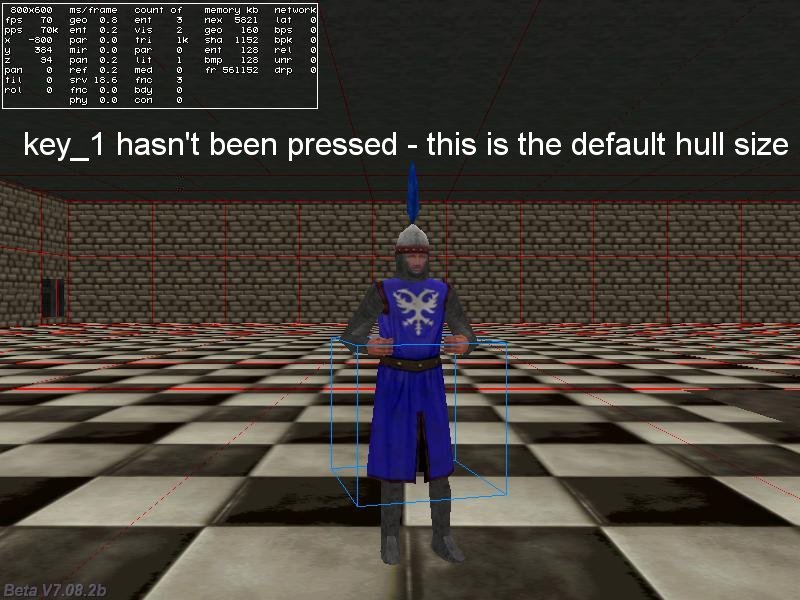
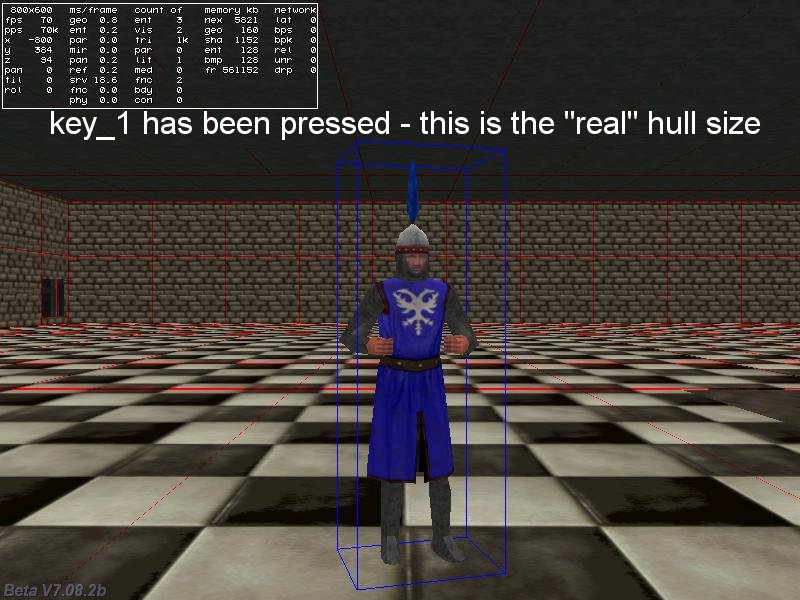
F: Wie ändere ich zu Zwecken der Kollisionserkennung die Größe der hull einer Entity auf die "echten" Werte?
A: Verwenden Sie c_setminmax(my); hier ist ein bebildertes Beispiel.
action entity_hull()
{
while (!key_1) {wait (1);} // wait until the "1" key is being pressed
c_setminmax(my); // now set the new hull to the "real" size of the entity
}
F: Ich habe zwei Entities, aber würde gern die Kontrolle von einer zur anderen geben mit der gleichen Player Action ohne mehrere Actions zu erstellen. Wie kann ich das erreichen?
A: Verwenden Sie den Code unten; geben Sie allen Spieler Models die Action set_player() und klicken Sie eine beliebige an, um sie zu kontrollieren.
BMAP* arrow_pcx = "arrow.pcx";
function mouse_startup()
{
// allow the player to switch the characters even if they are 10,000 quants away from each other
mouse_range = 10000;
mouse_mode = 1;
mouse_map = arrow_pcx;
while (1)
{
vec_set(mouse_pos, mouse_cursor);
wait(1);
}
}
function move_player()
{
var anim_percentage;
while (player == my)
{
camera.x = my.x - 200 * cos(my.pan); // place the camera 200 quants behind the player
camera.y = my.y - 200 * sin(my.pan);
camera.z = my.z + 300; // and 300 quants above its origin
camera.pan = my.pan;
camera.tilt = -35; // look down at the player
// move the player using the "W", "S", "A" and "D" keys; "10" = movement speed, "6" = rotation speed
c_move (my, vector(10 * (key_w - key_s) * time_step, 0, 0), nullvector, GLIDE);
my.pan += 6 * (key_a - key_d) * time_step;
if (key_w || key_s) // the player is walking?
{
ent_animate(my, "walk", anim_percentage, ANM_CYCLE);
anim_percentage += 8 * time_step; // "8" controls the "walk" animation speed
}
else // the player is standing still?
{
ent_animate(my, "stand", anim_percentage, ANM_CYCLE);
anim_percentage += 0.5 * time_step; // "0.5" controls the "stand" animation speed
}
wait (1);
}
}
function switch_players()
{
if (player == my) {return;} // don't make the switch if the actual player is clicked again
player = my;
camera.pan = my.pan; // start with a proper camera orientation
move_player();
}
action set_player()
{
player = my;
move_player();
my.emask |= ENABLE_CLICK;
my.event = switch_players;
}
F: Mein Spieler soll sich zu einem Ort (Vektor) im Level drehen, in diese Richtung laufen und anhalten, wenn er angekommen ist. Kann jemand helfen?
A: Bitte schön.
var destination[3] = {-350, 100, 100}; // set your own destination spot here
action move_to_spot()
{
VECTOR temp;
var anim_percentage;
vec_set(temp, destination);
vec_sub(temp, my.x);
vec_to_angle(my.pan, temp);
my.tilt = 0;
// the player is rotated in the proper direction here
while (1)
{
// got close enough to the destination? Then get out of the loop!
if (vec_dist(my.x, destination) < 100) {break;} // play with 100
c_move (my, vector(5 * time_step, 0, 0), nullvector, GLIDE);
ent_animate(my, "walk", anim_percentage, ANM_CYCLE);
anim_percentage += 6 * time_step; // "6" controls the "walk" animation speed
wait (1);
}
ent_animate(my, "stand", 0, ANM_CYCLE); // switch to standing
beep(); // the entity has reached the destination here, so do something else with it
}